
This week, a Lenovo ThinkPad Z16 G1 (21D4/21D5) came into our Notebook-Doktor workshop with a classic symptom: battery faulty. The laptop would only run on the power adapter, and the battery would no longer charge. The customer had already replaced the battery themselves. After the replacement, the device worked for about 14 days, then the same problem occurred again.

Table of Contents
Technical inspection
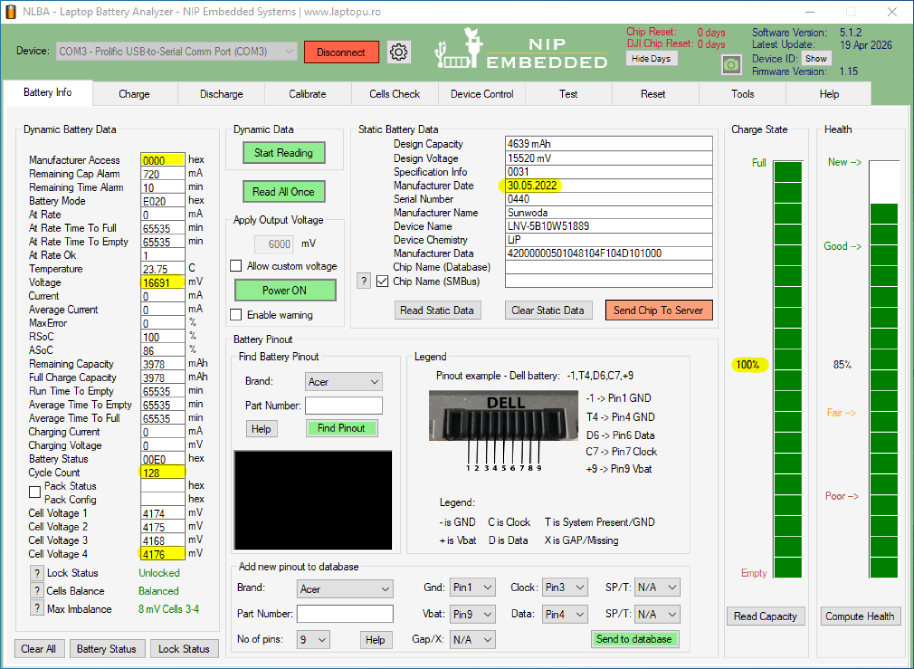
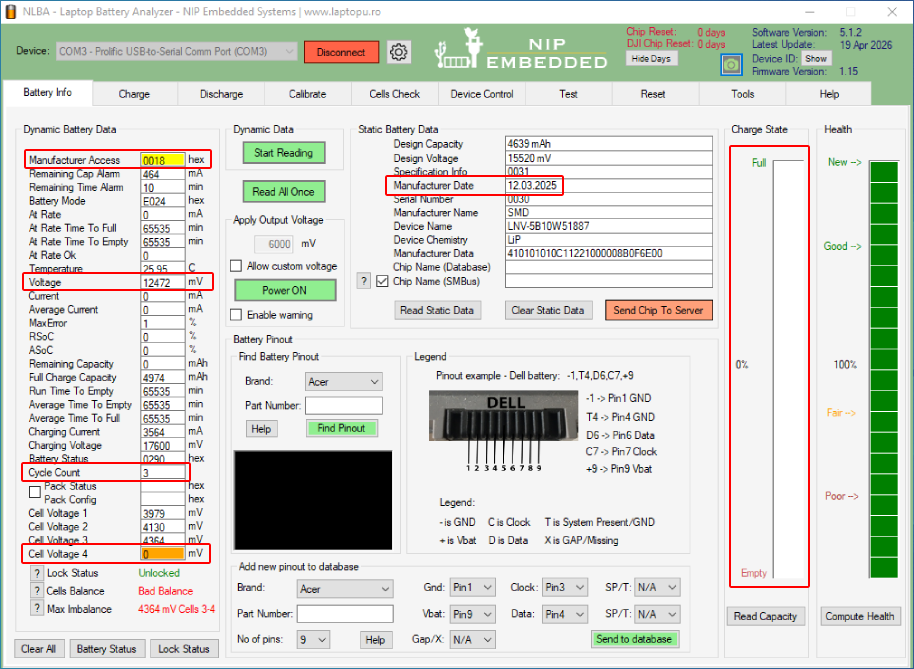
It quickly became clear: Battery faulty due to a cheap replacement!
When opening it up, our technician immediately saw: the installed battery was not an original Lenovo battery, but a low-cost replacement. At first glance, such batteries often look fine, but technically there are major differences.
In the lab it became clear: the replacement battery did not provide stable voltage. One battery cell was defective – which explains why it could neither charge nor deliver power reliably. For the system, that means: the battery is no longer detected or stays at 0%.
Additional cause - liquid damage
When removing the battery, signs of corrosion on the contacts were noticeable. These indicated minor liquid damage – presumably moisture entered the device at some point. Moisture can attack the charging electronics or the cell management in the battery, which in the long term leads to a complete battery failure.
So both the original battery and the replacement battery were defective – one likely due to liquid, the other due to low-quality cells.
Repair solution – original Lenovo battery installed
After the area was carefully cleaned, our technician installed an original Lenovo battery from our stock. After installation, the device was tested multiple times: charging, discharging, and voltage stability were flawless. The ThinkPad Z16 G1 works perfectly again.
To help your battery last longer, please keep the following in mind:
- Use original or OEM batteries.
- Avoid moisture – even small amounts can damage the battery/charging electronics.
- Don’t run it on mains power all the time – charge regularly.
- If there are problems: disconnect power and have a professional check it.
Conclusion – battery faulty? Quality pays off!
A battery fault can have many causes: age, moisture, or low-quality replacements. The ThinkPad Z16 G1 case clearly shows that going for a cheap battery doesn’t pay off in the long run.
With an original Lenovo battery and professional cleaning, the device runs stable and safe again.
Here are answers to the most important questions
How can I tell if my laptop battery is faulty?
Typical signs are significantly reduced runtimes, charging interruptions, the device suddenly shutting down, or an indicator that stays at 0% permanently. In such cases, the battery should be tested or replaced.
Why won’t my battery charge even though the power adapter works?
Besides a battery fault, the charging electronics on the motherboard may also be affected – especially after exposure to liquid. Defective connection cables or BIOS errors are also possible causes.
Is a replacement battery really that bad?
Not every replacement battery is automatically bad – but many cheap products cut corners on cell quality and protection circuits. This can lead to faster capacity loss or failure. We generally recommend original or tested OEM batteries.
Can moisture permanently damage the battery?
Yes. Moisture causes corrosion on the battery contacts and can destroy entire cells through short circuits. That’s why: if liquid gets into the device, switch it off immediately, unplug the power adapter, and have it professionally cleaned.
How long does a laptop battery usually last?
Depending on use and care, between 2 and 5 years. Frequent partial charge cycles, extreme temperatures, and constant use on mains power significantly shorten service life.
Repair at Notebook-Doktor
If your laptop shows similar symptoms – battery won’t charge, device only runs on the power adapter, or suddenly shuts down – we can help.
Start a repair request now or order the right original battery for your model directly in the shop at ipc-computer.de.